Classic Uno Family Card Game
Reviews
💡Classic Uno Family Card Game captures the essence of the original card game with its simple rules and engaging gameplay. The ability to play against computer opponents makes it convenient for solo sessions. The action cards add a layer of strategy, and the quick rounds are ideal for short breaks. It is a great choice for fans of casual card games.
Description
Game Introduction
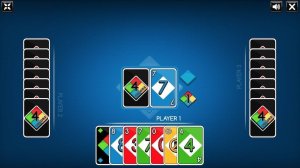
The Classic Uno Family Card Game is a digital version of the well-known matching card game. The main goal is to be the first player to get rid of all cards in your hand. Players take turns matching a card from their hand with the card on the discard pile, based on color, number, or symbol. The game includes special action cards that add strategy and surprise. This online adaptation keeps the original rules, making it easy for both experienced players and newcomers to enjoy. Games are quick and require no setup, allowing for convenient play at any time. The computer-controlled opponents provide a consistent challenge, making it a great option for solo play. The familiar gameplay and simple interface make it accessible to players of all ages.
How to Play
At the start, players choose how many opponents to face, typically two, three, or four. Each player is dealt seven cards. The top card of the draw pile is turned over to start the discard pile. On a turn, a player must play a card that matches the discard pile by color, number, or symbol. If a player cannot play, they draw one card from the draw pile. Action cards have special effects: Skip makes the next player lose a turn, Reverse changes the direction of play, Draw Two forces the next player to draw two cards and skip their turn, and Wild lets the player choose the next color. The first player to discard all cards wins. When a player has one card left, they must call out UNO. If caught forgetting, they draw two penalty cards.
Game Features
This game includes all the original action cards, such as Skip, Reverse, Draw Two, and Wild. Players can choose to play against two, three, or four computer opponents. The controls are simple and intuitive, making the game easy to play on various devices. Rounds are quick, making it suitable for short breaks or longer play sessions. Computer opponents provide a consistent challenge without needing other people. No account or sign-up is required to start playing, so players can jump right into a game.
Tips for Success
Pay attention to the cards your opponents play to guess their remaining colors or numbers. Use action cards strategically. Save Wild cards for when you have no matching color, and use Draw Two or Skip to disrupt opponents. Keep track of the discard pile to plan your moves. When you have one card left, always call out UNO to avoid penalty. Practice regularly to improve your speed and decision-making.
✅ Compatibility & Testing
Faq
Can I play Classic Uno Family Card Game on my mobile phone?
Is there a time limit for each turn in the game?
Do I need to create an account to save my progress?
What happens if the draw pile runs out of cards?
Can I choose the difficulty level of the computer opponents?
Are there any special rules for the Wild Draw Four card in this version?
You May Also Like
Tactical Command Strategy

Galaxy Wars Space Defender Arcade

Safe Haven: Survival Strategy

Cooperative Health Defense

Cabin Puzzle: Cooperative Mystery

Mecha Allstars Combat Arena
Ghostly Puzzle Escape

MiniFig Defender Tower Strategy

Space Pilot X-Wing Adventure