3D Bowling Sports Arcade
Reviews
💡3D Bowling Online Game delivers a polished bowling experience with realistic ball physics and three difficulty levels. The local multiplayer mode is a nice touch for playing with friends. Controls are intuitive, and the game runs smoothly on both mobile and desktop. Replay value is high due to the adjustable difficulty and the challenge of improving your strike rate. A clean, family-friendly sports game that is easy to pick up and enjoy.
Description
Game Introduction
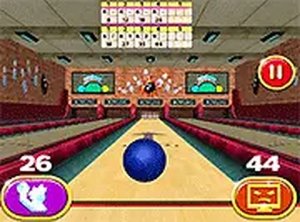
3D Bowling Online Game brings the classic sport of bowling to your browser with realistic 3D graphics. You control a bowling ball on a polished lane, aiming to knock down all ten pins. The game recreates the excitement of a real bowling alley, making it accessible for players of all ages. Whether you have a few minutes or an hour, this free game provides a satisfying challenge.
How to Play
Start by aiming your ball left or right using on-screen controls. Swipe your finger or mouse to throw the ball down the lane. To add spin, swipe in a direction after releasing. Your goal is to knock over all pins with your first ball for a strike, or clear the remaining pins on your second roll for a spare. The game keeps score automatically. You can play in full screen mode for a more immersive experience.
Game Features
Realistic 3D graphics create an immersive bowling environment. The game offers three modes: practice alone, local multiplayer with a friend on the same device, or versus the computer with easy, medium, and hard difficulty settings. Simple swipe controls make the game easy to learn. Full screen support enhances the experience on any device.
Tips for Success
Practice your aim and spin control to improve your scores. Focus on hitting the pocket (between the 1 and 3 pins for right-handers, or 1 and 2 for left-handers) for consistent strikes. Adjust your speed and spin based on lane conditions. Play regularly to develop muscle memory and learn how the ball reacts to different surfaces.
Compatibility
Faq
Is the game free to play?
Can I play against a friend?
What difficulty levels are available?
Does the game support full screen?
How does scoring work in bowling?
Can I add spin to the ball?
You May Also Like

Cube Surfer Arcade Runner

Slam Dunk Arcade Challenge

Street Basketball 3v3 Dunk Sports Game

Hoop World: Flip Dunk Arcade

Endless Golf Arcade

3 Point Rush Basketball Arcade
Air Hockey Arcade Sports

8 Ball Billiard Sports Game

Dangerous Turn Arcade Game