Long Words Per Minute Typing Challenge
Reviews
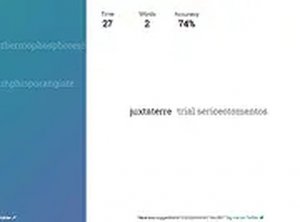
💡Long Words Per Minute is a simple but effective typing game that focuses on longer words, which can be more challenging than standard typing tests. The 60-second timer keeps each round short and engaging, and the real-time score display helps you see your progress instantly. It is a good tool for anyone looking to improve their typing skills, especially for words that require more careful finger placement. The game is easy to use and runs smoothly in a browser. It offers good replay value as you try to beat your own high score.
Description
Game Introduction
Long Words Per Minute is an online typing game designed to test your speed and accuracy with longer, more challenging words. The core objective is to type each displayed word correctly as quickly as possible within a 60-second time limit. Each correct word adds to your score, and you aim to achieve the highest score possible before time runs out. This game is a focused and fun way to practice typing longer words, improve your keyboard skills, and enjoy a simple yet engaging challenge. It runs directly in your browser without any downloads, making it easy to start playing immediately. Whether you are a beginner looking to build confidence or an experienced typist seeking a new challenge, Long Words Per Minute offers a valuable and enjoyable experience.
How to Play
To play, simply start the game and a series of long words will appear on the screen. Type each word exactly as shown using your keyboard. Press the spacebar or enter key to submit the word and move to the next one. The faster and more accurately you type, the higher your score will be. You have 60 seconds to type as many words as possible. The game tracks your correct words and total score in real time. For the best experience, use a desktop computer with a keyboard and mouse. You can also enable full screen mode for a more immersive experience. Keep practicing to improve your typing speed and accuracy.
Game Features
This game offers a fun and challenging typing speed test with long words. The 60-second timer adds urgency and focus. Real-time score tracking helps you monitor your progress. Full screen mode is available for an immersive experience. The game is free to play with no downloads required, providing a clean and focused way to practice typing longer words.
Tips for Success
To succeed, practice regularly to build muscle memory and improve your typing speed. Focus on accuracy first, as each correct word adds to your score. Try to maintain a steady rhythm rather than rushing, as errors can slow you down. Use all your fingers for typing to increase efficiency. Finally, stay calm and focused during the 60-second round to maximize your performance.
Compatibility
Faq
Is Long Words Per Minute free to play?
What devices can I use to play this game?
Does the game save my progress or high scores?
Can I play this game offline?
Are there different difficulty levels or word categories?
How can I improve my score in Long Words Per Minute?
You May Also Like

Snake Puzzle Challenge
Long Words Per Minute Typing Challenge

Color Rings Puzzle Game
Need Light Reflex Arcade

Emoji Crash Match Puzzle

Keepy Ups Soccer Arcade
Gobang Marble Match Puzzle

FNF Soft Rhythm Game

Little Strawberry Jump Arcade