Reviews
Pixel Garden Builder offers a serene creative outlet for garden enthusiasts and casual players alike. The pixel art style is charming, and the open world grid provides endless possibilities. The dual online/offline modes add flexibility, allowing you to collaborate or focus solo. The cooldown system encourages thoughtful design rather than rushed placement. It is a refreshing break from fast-paced games.
Description
Game Introduction
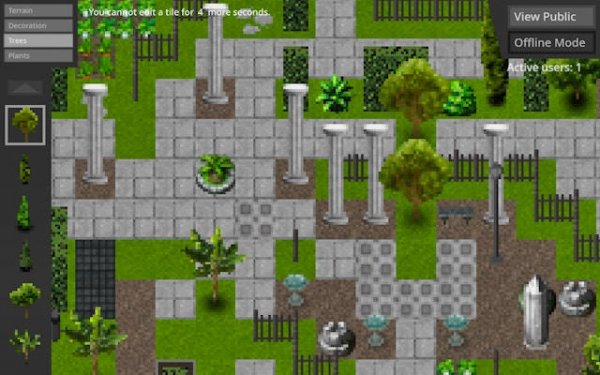
Pixel Garden Builder is a relaxing online game where players design and share virtual gardens. The game uses a pixel art style and an open world setting, providing a calm space for creativity. The main goal is to create landscapes by placing tiles on a grid, building paths, gardens, and natural scenes. What makes this game unique is its peaceful pace and focus on thoughtful design, making it suitable for gardening enthusiasts and creative builders. Players can express themselves through garden layouts without pressure or time limits.
How to Play
To begin, players select a mode and use simple mouse controls to browse a sidebar menu of available tiles. Clicking a tile selects it, and clicking on the main grid places it. A short cooldown between placements encourages careful decisions. In online mode, players can see contributions from others in real time, adding a social element. Offline mode allows for focused solo creation. The controls are intuitive and easy to learn, making the game accessible to all ages.
Game Features
Features include a thoughtful placement system with a cooldown that promotes mindful creativity. The game offers a variety of tiles and elements for design, along with dual play modes for online collaboration or offline solo work. It provides an optimized visual experience that runs smoothly in full-screen mode. Real-time updates in online mode allow players to see changes as they happen. Simple mouse-based controls make the game easy to pick up and enjoy.
Tips for Success
Take your time with each placement to create a cohesive design. Experiment with different tile combinations to discover unique patterns. In online mode, observe others' contributions for inspiration. Use offline mode to practice and refine your ideas without distractions. Plan your garden layout before placing tiles to make the most of the grid space. Enjoy the process and let your creativity flow without pressure.








03 Comments
Sign in to comment
You must be logged in before posting a review or rating.
No account? Create one
No comments yet. Be the first to comment!