Reviews
Fruit Candy Pop Match offers a delightful puzzle experience with its vibrant fruit and candy theme. The game is easy to learn, with intuitive aiming and shooting mechanics. Power-ups add strategic depth, and the lack of time limits makes it perfect for casual play. The progressive difficulty keeps each level engaging without being stressful. Overall, it is a well-designed family-friendly game that provides hours of fun.
Description
Game Introduction
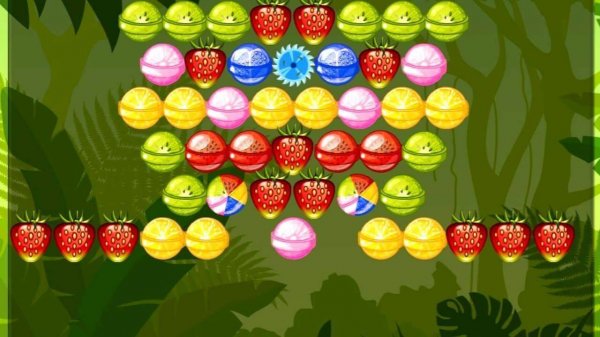
Fruit Candy Pop Match is a classic puzzle game that combines the familiar mechanics of a bubble shooter with a colorful theme of fruits and candies. Players aim and shoot sweet treats from a cannon at the bottom of the screen to clear clusters above. The core objective is to match three or more identical fruit candies, making them pop and disappear. As the board clears, new items and power-ups may appear, adding variety to each level. Designed for all ages, this game offers a relaxing yet mentally engaging experience that is easy to pick up and enjoy. The cheerful graphics and simple controls make it a great choice for casual players looking for a stress-free pastime.
How to Play
Players control a cannon positioned at the bottom of the screen. By moving a finger or mouse, you aim the cannon and tap or click to launch a candy toward the cluster above. The goal is to land your candy next to two or more identical candies to create a match of three or more. When matched, the candies pop and you earn points. After each shot, the ceiling lowers slightly, bringing the cluster closer to the bottom. If the cluster reaches the bottom, the level ends. Clear all candies from the board to win and earn bonus points for combos. Power-ups such as bombs and color changers may be available to help clear the board more efficiently.
Game Features
This game features colorful graphics with fruit and candy designs that create a cheerful visual experience. It includes power-ups like bombs that remove a large area and color changers that allow you to match any candy. The game offers progressive difficulty, with the ceiling lowering after each shot to increase pressure. Each level presents a new layout, encouraging strategic thinking. Controls are simple and suitable for all ages, with no time limits, allowing for relaxed play. Combo bonuses reward players for matching multiple groups at once.
Tips for Success
To succeed in this game, take your time to aim carefully before each shot, as the ceiling drops after every move. Plan your shots to create large matches and combos, which yield higher scores and help clear the board faster. Use power-ups strategically—save bombs for dense clusters and color changers when you have many unmatched candies. Practice regularly to improve your aim and pattern recognition. Staying calm and focusing on one shot at a time can help you maintain control as the pressure increases.








03 Comments
Sign in to comment
You must be logged in before posting a review or rating.
No account? Create one
No comments yet. Be the first to comment!