
Reviews
Soccer Arcade Monster Fun offers a refreshing take on soccer with its playful monster theme. The controls are intuitive, making it easy for anyone to pick up and play. The colorful graphics and cheerful sound effects create a welcoming atmosphere. Each level introduces new challenges, keeping the gameplay engaging without becoming repetitive. It is a safe, fun choice for families.
Description
Game Introduction
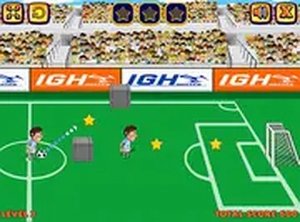
Soccer Arcade Monster Fun is a lively and entertaining soccer game that puts a playful twist on traditional football. In this cheerful challenge, you control a soccer player on a field filled with mischievous monsters. Your goal is to outsmart these creatures by kicking the ball past them and scoring goals to earn points. The game features colorful graphics, cheerful sound effects, and simple controls that make it accessible for players of all ages. Each level introduces new monster types and obstacles, keeping the gameplay fresh and engaging. Whether you are a soccer fan or just looking for a fun time, Soccer Arcade Monster Fun offers a unique blend of sports and lighthearted action that is safe and enjoyable for everyone.
How to Play
To play Soccer Arcade Monster Fun, use your mouse or touch screen to aim and kick the ball towards the goal. Watch out for monsters that try to block your shots or steal the ball. You can tap or click to shoot with precision, timing your moves to avoid monster defenses. Each successful goal earns you points, and you can unlock new challenges as you progress. The game is easy to pick up but offers enough variety to keep you entertained. Just focus on scoring and having fun—no complicated rules or violent content involved. Perfect for quick play sessions or longer gaming breaks.
Game Features
Fun soccer action with cute monster characters. Easy controls that anyone can learn quickly. Family-friendly gameplay with no violent content. Colorful graphics and cheerful sound effects. New monsters and obstacles in each level for variety.
Tips for Success
Practice your aim and timing to overcome monster defenses. Observe each monster's movement pattern to find the best moment to shoot. Focus on accuracy rather than power, as precise shots are more likely to find the net. Take breaks between levels to keep your reflexes sharp. Enjoy the process and don't get discouraged by tricky obstacles—each attempt helps you improve.



03 Comments
Sign in to comment
You must be logged in before posting a review or rating.
No account? Create one
No comments yet. Be the first to comment!